
Life360: Family Safety & GPS review
 Analysis by GetAllApps
Family coordination often begins with a small question: has everyone arrived safely, and does anyone need a hand? Life360: Family Safety & GPS is built to make those check-ins easier by bringing location sharing and safety tools together in one place. Rather than relying on a string of messages, family members can use the app to stay informed about one another’s whereabouts and relevant travel events. I find that practical focus appealing: it is less about adding another social feed and more about reducing uncertainty during everyday routines.
From everyday uncertainty to a shared picture
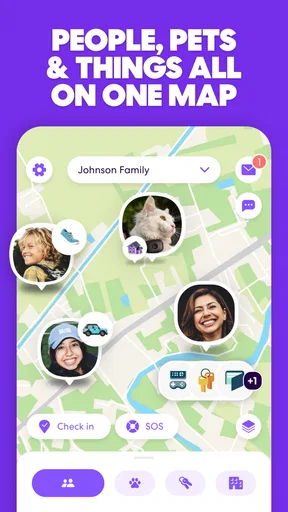
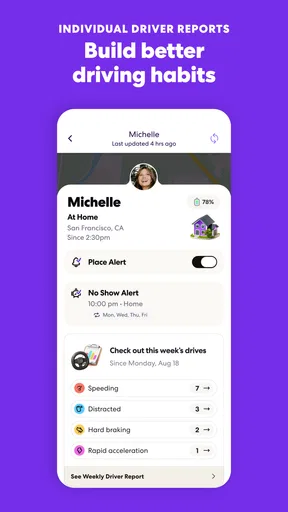
Life360 sits in the lifestyle category, but its appeal is especially clear for families and other groups who coordinate often. The starting point is a shared need: one person is travelling, another is waiting at home, and everyone would rather avoid repeated “Where are you?” messages. The app’s central idea is to make location sharing part of a common view, with additional safety features such as crash alerts and driver reports contributing context around travel.
The first thing I would consider is whether everyone involved is comfortable using a shared safety app. Location sharing works best when the people in a group understand why they are using it and agree on how it fits into their routine. That conversation matters as much as the technology. When the purpose is mutual reassurance rather than constant checking, the app can feel like a helpful coordination tool instead of an interruption.
Life360 has been around since April 7, 2010, and its reach suggests it has become a familiar option for people looking for family safety features. It has more than 100 million installs, with an average rating of 4.8 from around 2.5 million ratings. Those figures point to broad interest, though any family’s experience will still depend on its habits, expectations, and comfort with sharing location information.
Getting the routine started
A useful way to approach the app is to begin with the routine you want to improve. Perhaps family members travel separately to school, work, appointments, or social plans. The aim is not to watch every movement; it is to make ordinary coordination less effortful. Once a group has settled on that purpose, location sharing can provide a shared reference point for check-ins, while safety-related tools can add information when travel raises a concern.
I like this workflow because it starts with a real need rather than a list of features. An app can offer plenty of tools and still feel unnecessary if it does not solve a problem that comes up in daily life. Life360’s combination of location sharing, crash alerts, and driver reports gives families several related reasons to keep it in mind, without changing the basic goal: help people stay connected around movement and safety.
Following the journey, step by step
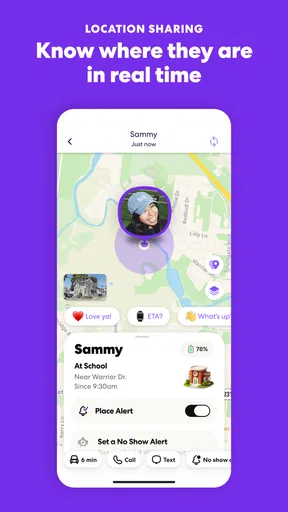
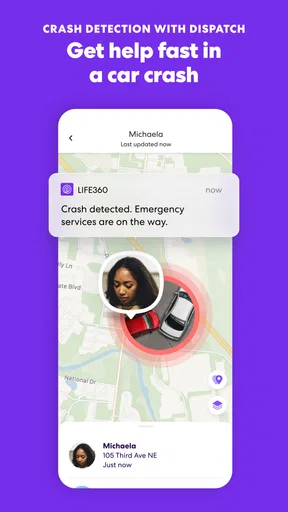
In a typical routine, one person sets off while others want to know how the trip is going. The shared location view can help answer the simple question of where that person is, while the group avoids sending repeated messages just to establish the basics. If a safety event becomes relevant, crash alerts are part of the app’s broader approach to keeping family members informed. Driver reports add another travel-oriented element, giving the app a role beyond a map-based check-in.
The value is in the handoff between information and action. A family member sees an update, understands that someone is travelling, and can decide whether a message or call is actually needed. That can cut down on guesswork. It does not replace a direct conversation, and it should not be treated as a guarantee that every journey will be trouble-free. Instead, I see it as a shared layer of awareness that can make a direct check-in more timely and purposeful.
For instance, if someone is expected to arrive and has not yet checked in, the family can use the app’s shared view as a starting point for deciding what to do next. If the information suggests a routine trip is still underway, there may be no need to send several messages. If something appears concerning, the family can follow up directly. This kind of decision-making is where a safety app can be most useful: it gives people context, while leaving judgment and communication in their hands.
Where family members hand off information
Life360 is designed around more than one person, so the handoffs between family members are central to the experience. The person travelling contributes the location and travel context; the person waiting can use that context to decide whether to wait, check in, or offer help. When plans change, a direct conversation remains important, but a common reference point can make that conversation easier to start.
That shared approach can be particularly helpful when several people have different schedules. Instead of each person keeping a separate mental picture of who is where, the group has a single place to check. I can see why this would appeal to parents coordinating with children, partners managing separate commutes, or relatives who want a straightforward way to stay connected. The app’s usefulness grows when everyone understands the group’s expectations and treats updates as information, not as a reason to monitor one another constantly.
There is also a practical human handoff: the person who notices a concern has to decide whether to act. An alert or report may prompt a call, a message, or simply a moment of reassurance. That is a sensible division of labour. The app can surface relevant information, but family members supply the care, context, and follow-through. Keeping that distinction clear helps avoid expecting software to make decisions that belong to people.
What the workflow delivers
At its best, Life360 turns scattered check-ins into a more coherent routine. Family members can share location, stay aware of travel, and use safety-related information as a prompt for communication. The result is not necessarily dramatic; often, the benefit is simply less uncertainty during an ordinary day. That understated usefulness is a strength. A tool that helps people answer a recurring question quickly can earn its place without demanding constant attention.
The app is free to download, which makes it easy for families to consider trying the basic experience. It also offers in-app purchases, with items ranging from $1.49 to $249.99. I would treat paid options as something to review against the group’s actual needs rather than as an automatic part of getting started. The core decision is whether the app’s style of shared safety information fits the way a family communicates.
Life360 is available for Android and iOS, and its current version is 26.40.0. It requires Android 10 or later on Android devices. The app is rated for Everyone, which gives a quick indication of its broad content audience, while parents and family members should still decide together how they want to use a location-sharing tool. The product’s long history and large user base make it a recognizable choice in the family safety space, but a good fit still comes down to the people using it.
Where the flow can feel less natural
The same shared awareness that makes Life360 useful can also create friction. Not everyone wants location sharing to be part of daily life, and a family may have different expectations about when it is helpful. If some members see the app as reassurance while others experience it as pressure, the workflow breaks before the technology has a chance to help. Clear, mutual expectations are essential: agree on the purpose, talk openly about how the information will be used, and revisit the arrangement if it stops feeling comfortable.
Another possible snag is over-reliance. A map view, alert, or driver report should not become the only way family members communicate. Plans change, context matters, and people may need to explain what is happening directly. I would use the app to support a conversation, not replace one. That mindset keeps the workflow grounded and prevents a routine update from being treated as a complete account of someone’s situation.
There is also a difference between receiving information and knowing what it means. A family member may see an update and still need to decide whether it calls for action. That judgment can depend on the person, the trip, and the family’s normal routine. Life360 can help reduce the effort of finding basic context, but it cannot remove every uncertainty. The most realistic expectation is added awareness, followed by human follow-through when needed.
For families who are uneasy about sharing location, this may not be the right fit, and that is worth acknowledging before making it part of a routine. A safety tool works best when participation feels agreed upon rather than imposed. When people are on the same page, the app’s features can support trust; when they are not, frequent checking can become its own source of tension. The conversation around use is therefore not a side issue—it is part of setting up a healthy workflow.
Who is likely to find it useful
I would recommend considering Life360 if your household regularly coordinates journeys and wants a shared way to check in. It is especially relevant when family members value location sharing and would welcome travel-focused safety tools in the same app. The combination is easy to understand: start with a shared view, use alerts and reports as context, then follow up with one another when it makes sense.
It may be less appealing if your group prefers to keep location information private or already has a check-in routine that works smoothly. That does not make the app ineffective; it simply means the problem it is designed to address may not be a priority for every household. Choosing it should be about improving a real routine, not installing it because a feature list sounds reassuring.
Life360: Family Safety & GPS has earned substantial attention, with around 314,000 written reviews alongside its broader rating base. I would take that popularity as a sign that many people see value in family coordination tools, not as a promise that every household will use the app in the same way. Its strongest case is practical: bringing location sharing and travel-related safety information into one place so people can move from uncertainty to a better-informed check-in.
Overall, Life360 makes the most sense as a shared support tool, not a substitute for trust or direct communication. Start with a clear purpose, agree on how location sharing should fit into family life, and use the app’s updates as context for thoughtful follow-up. If that approach matches your household, its blend of location sharing, crash alerts, and driver reports can make everyday coordination feel more manageable. If it does not, the app’s broad reach alone is no reason to change a routine that already works.
Pros and cons
Pros
- Location sharing makes it easier to check where family members are.
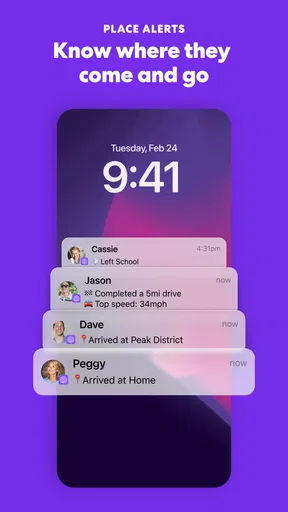
- Arrival alerts can notify you when someone reaches a saved place.
- A shared map helps coordinate meetups and pickups.
- Location history can help retrace recent trips.
- Circle settings let members choose who can see their location.
Cons
- Accurate location sharing depends on phone settings and connectivity.
- Frequent GPS updates can drain battery life.
- Some safety features require a paid subscription.
- Background location access may raise privacy concerns.
- Alerts can be delayed when a device has weak signal.


